Shopify app · B2B & D2C
Pay early. Pay less.
Skonto is the cash discount German-speaking businesses expect: pay within 7 days and deduct 2%. Skonto Pay adds it to Shopify without workarounds – for orders paid by bank transfer.
Example · 2% Skonto, 7 days
- Order total
- €904.22
- Skonto 2%
- −€18.08
- Amount to pay by 19 October 2026
- €886.14
After that the Skonto expires and the full €904.22 is payable by the final deadline, 11 November 2026.
It is loaded from YouTube only when you press play.
How it works
One order that corrects itself once the payment is in.
The order is placed at the full amount
Your buyer chooses bank transfer with Skonto in checkout. The order is placed at the full amount. The reduced amount, the deadline and your bank details are shown in checkout, on the thank-you page and in the customer account.
You confirm the payment
When the money arrives in time, staff confirm it with one click on the order – with the amount received and the value date.
The order is reduced
The same order is reduced by the Skonto, VAT included, and marked as paid. Late payers simply owe the full amount.
Video
Setup and your first order, in six steps.
Settings, the payment method, the checkout blocks, a test order, the list of Skonto orders and confirming the payment.
It is loaded from YouTube only when you press play.
Features
What Skonto Pay takes care of.
Skonto terms shown in checkout, on the thank-you page and the order status page
The amount, the deadline and what happens after it, calculated from the order total.
One-click payment confirmation reduces the order to the cent, VAT included
Enter the amount and the value date. Paid in time: the order is reduced and marked as paid.
Deadlines tracked automatically: active, Skonto expired, overdue
The app checks the deadlines once a day and sets the status of every Skonto order.
For B2B companies – optionally for consumers, with safeguards against abuse
A limit of unpaid orders per customer, automatic cancellation, minimum and maximum order total.
Ready-made snippet with amount, deadline and bank details for the order email
A snippet for the order confirmation. Only orders paid with the Skonto payment method show it.
A closer look
From checkout to a paid order.
Checkout
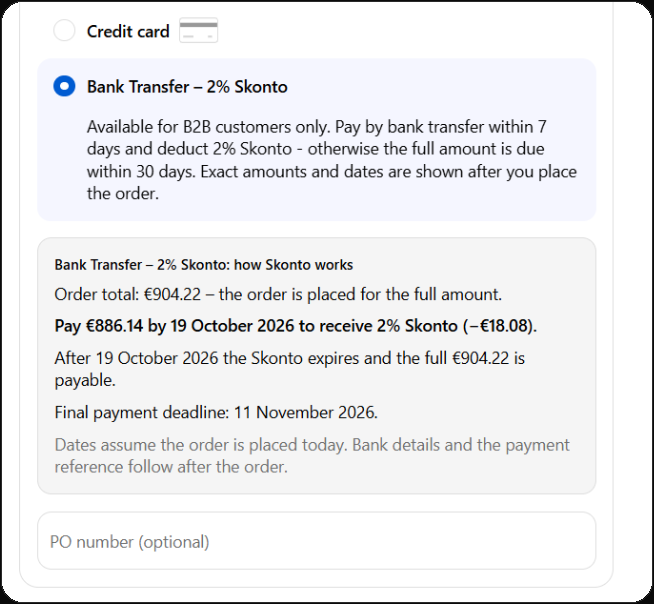
Skonto terms, right where buyers choose how to pay
The amount, the deadline and what happens after it, calculated from the order total.
The block below the payment methods needs checkout extensibility (Shopify Plus).
After the order
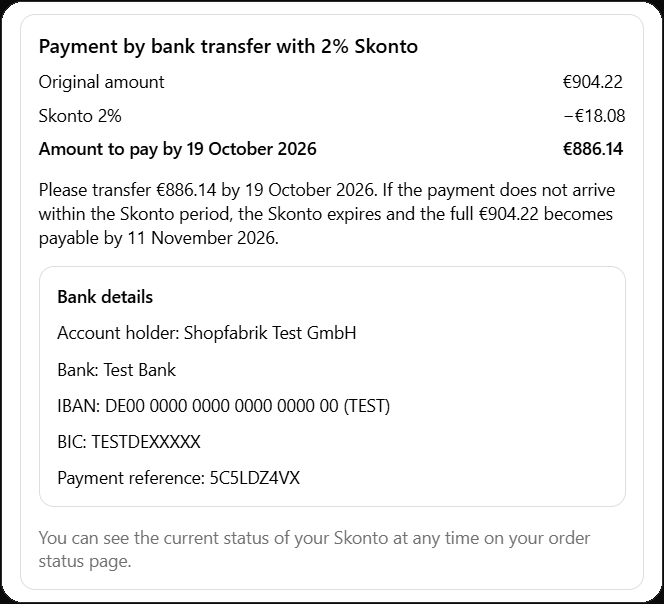
Amount, deadline and bank details on the thank-you page
The same block appears on the order status page, and a snippet adds it to the confirmation email.
Payment confirmation
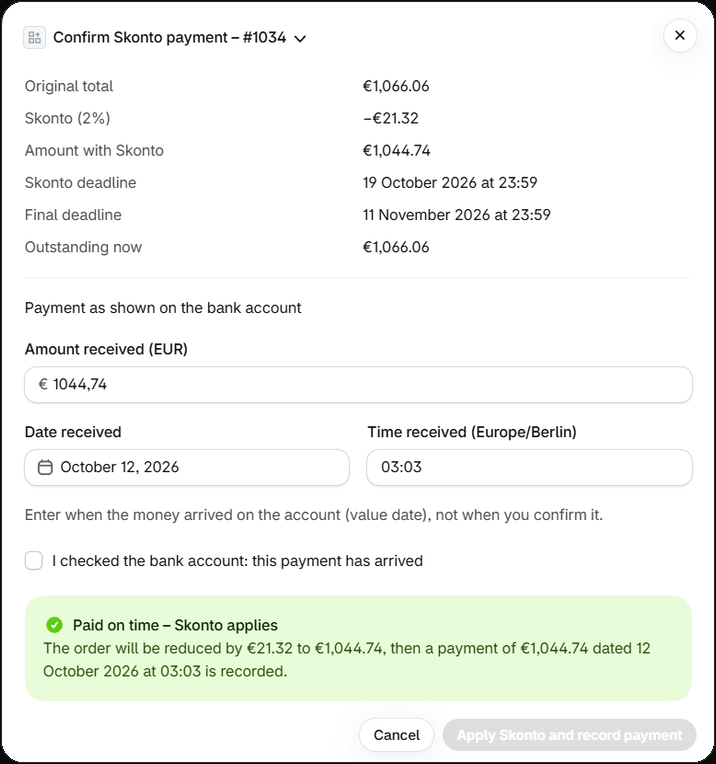
Confirm the transfer and the order corrects itself
Enter the amount and the value date. Paid in time: the order is reduced, VAT included, and marked as paid.
Skonto orders
Every Skonto order with its deadlines and status
Active, Skonto expired, overdue or paid: the app checks the deadlines once a day.
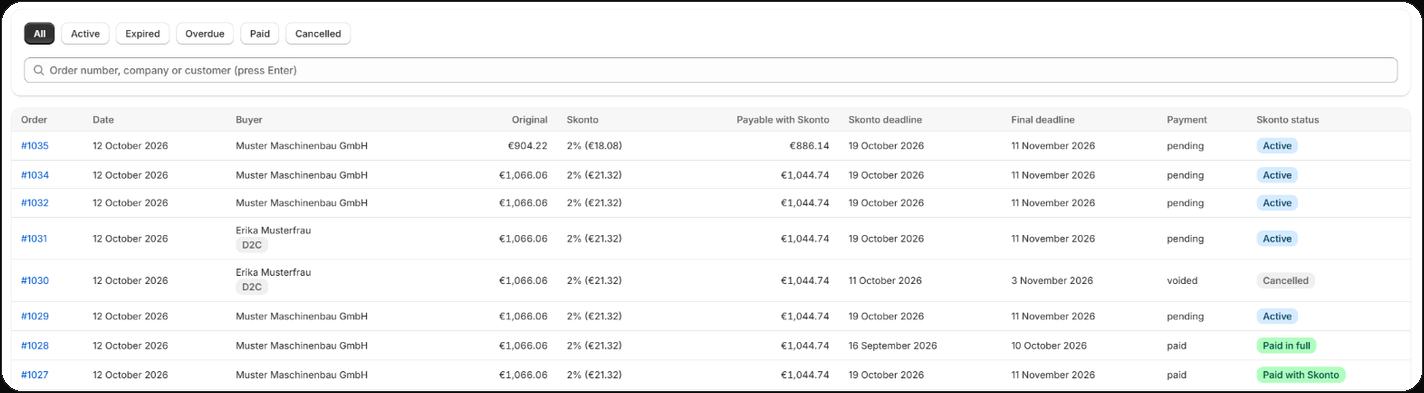
Captures from a test store with fictional names.
Who it is for
For companies and, if you choose, for consumers.
B2B · default
Only company buyers see the Skonto payment method
After installation Skonto is offered only to buyers purchasing for a B2B company. Allow all companies or enable selected ones.
D2C · optional
Consumers too, with safeguards
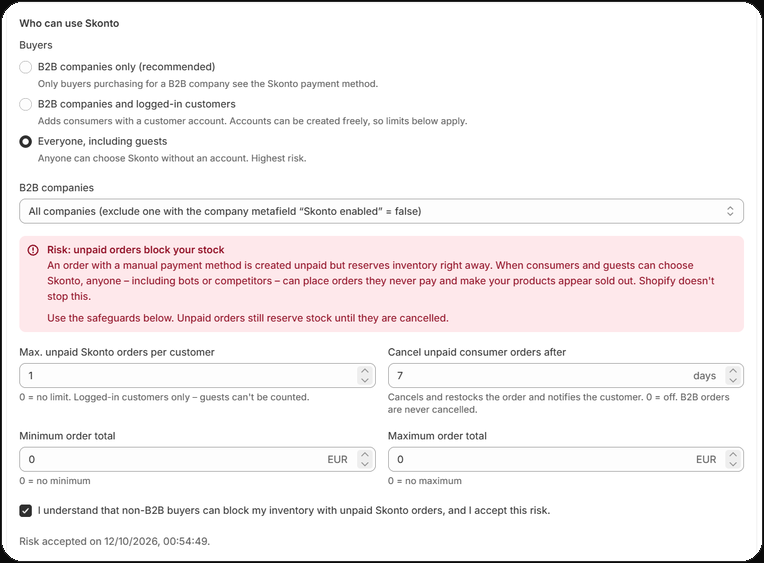
If you choose, Skonto is also offered to logged-in customers or to everyone, including guests. Because unpaid orders reserve stock, you acknowledge the risk first and set limits: a cap on unpaid Skonto orders per customer, automatic cancellation, and a minimum and maximum order total.
Pricing
Three plans. The difference is the number of Skonto orders.
Free
$0Free
- 15 Skonto orders per month
- B2B and D2C
- Checkout, thank-you and order status blocks
Growth
$19/ month
- 300 Skonto orders per month
- B2B and D2C
- Checkout, thank-you and order status blocks
- 14-day free trial
Pro
$49/ month
- Unlimited Skonto orders
- B2B and D2C
- Checkout, thank-you and order status blocks
- Priority support
- Help with the setup
- 14-day free trial
All plans include B2B and D2C. What counts is the number of Skonto orders per calendar month. Prices are in US dollars and billed through Shopify.
Frequently asked
Short answers.
Does the order total change?
Not at first: the order is placed at the full amount. Only when you confirm that the payment arrived in time is the same order reduced by the Skonto and marked as paid – no second order is created.
The basis is the final order total including shipping and taxes. An order keeps the terms it was placed with; if you change the percentage or the periods later, that applies to new orders only.
What happens when my customer pays late?
After the Skonto deadline the Skonto expires and the full amount is payable by the final deadline. The app checks the deadlines once a day and sets the order’s status: active, Skonto expired, overdue. Your customer sees the current state on the order status page.
What counts is when the money arrived in your account (value date), not when you confirm it: a payment that arrived before the deadline can still be confirmed with Skonto afterwards. If a customer transfers the reduced amount after the deadline, the remainder stays outstanding.
Do I need Shopify Plus?
Not for everything. The block below the payment methods in checkout is a checkout UI extension and needs checkout extensibility on Shopify Plus. The blocks on the thank-you page and the order status page work on all Shopify plans.
What counts towards my plan’s monthly limit?
Every new Skonto order, that is every order placed with the Skonto payment method in the current calendar month. The month follows your shop’s time zone.
When the limit is reached, the Skonto payment method is hidden in checkout – until the next month or until you upgrade. Existing Skonto orders are not affected.
Skonto in Shopify. No workarounds.
Skonto Pay is coming to the Shopify App Store soon. Questions about the app or the setup before then? Write to us.